Business website structure planning guide for UK SMEs
5 June 2026 · 3 min read
Business website structure planning guide for UK SMEs

Business website structure planning is the process of organising your website’s pages, navigation, and content hierarchy to maximise usability and search engine performance. For UK small and mid-sized businesses, getting this right before a single line of code is written separates websites that generate enquiries from those that simply exist. A well-planned site architecture affects how Google crawls your pages, how quickly visitors find what they need, and whether your content builds genuine topical authority over time. This guide covers the key principles, practical steps, common mistakes, and tools you need to plan a site that works hard for your business.
What are the best practices for organising your business website structure?
Good site architecture follows a clear hierarchy, logical URL paths that mirror that hierarchy, and deliberate internal linking to support both crawlability and topical authority. The practical target is keeping every important page within three to four clicks of the homepage. Beyond that depth, both users and search engine crawlers start to lose interest.
Here are the core website structure best practices to apply from day one:
- Shallow hierarchy. Aim for a maximum of three to four levels: homepage, category, subcategory, and page. Anything deeper buries content.
- Keyword-friendly URLs. Clean, descriptive URLs mirror your content hierarchy and include relevant keywords. Avoid ID numbers, long query strings, or random characters.
- Pillar and cluster pages. Group related content around a central pillar page, with supporting cluster pages covering specific subtopics. This builds topical authority and keeps your internal linking logical.
- Mobile navigation. Design menus for thumb-reach on mobile first. Hamburger menus, sticky headers, and clear labels reduce friction for the majority of UK users browsing on smartphones.
- Scalability. Leave room in your category structure for new services, locations, or blog topics. Retrofitting a rigid structure later is expensive and disruptive.
Pro Tip: When planning your URL structure, write it out in a spreadsheet before touching your CMS. Changing URLs after launch forces 301 redirects and risks losing ranking signals you have already built.
Accessibility is not optional. WCAG 2.2 requires a minimum colour contrast ratio of 4.5:1 and adequate white space to aid readability. For UK businesses, accessibility compliance also carries legal weight under the Equality Act 2010.

| Structural element | Best practice standard |
|---|---|
| Page depth | No critical page more than 4 clicks from homepage |
| URL format | Lowercase, keyword-rich, no special characters |
| Mobile font size | Minimum 16px for body text |
| Colour contrast | At least 4.5:1 ratio for text on background |
| Navigation levels | Maximum 3 to 4 tiers in the sitemap |
How to plan your website content and map it to user search intent
Different pages on your site must satisfy distinct search intents: informational, navigational, or transactional. A service page and a blog post serve entirely different purposes, and writing them in the same tone and format is one of the most common mistakes UK SMEs make. Mapping content to intent is the foundation of effective website planning.
Follow these steps to align your content with what users are actually searching for:
- Categorise your pages by intent. Transactional pages (services, pricing, contact) need clear calls to action and concise copy. Informational pages (guides, FAQs, blog posts) need depth and authority. Navigational pages (homepage, about) need clarity and direction.
- Assign one primary keyword per page. Mapping keywords at page level avoids cannibalisation and allows each page to rank for one head query, with cluster pages covering related long-tail terms.
- Build content clusters. Group your blog posts and supporting pages around a central pillar page. Link from each cluster page back to the pillar and between related clusters. This tells search engines you have comprehensive coverage of a topic.
- Write for the journey stage. A visitor reading a how-to guide is not ready to buy. A visitor on your pricing page is. Match the content depth, tone, and call to action to where the user is in their decision process. The gtwelve guide on conversion-focused web design covers this in detail.
- Plan internal links deliberately. Every cluster page should link to its pillar. Pillar pages should link to the most relevant cluster pages. This distributes authority across your site and reinforces topical relevance.
- Wireframe with real content. Wireframes built from real copy uncover layout problems early. Placeholder text hides issues like overlong headings, missing tables, or awkward content flow that only become visible when real words are on the page.
Pro Tip: Before writing a single word of copy, create a simple spreadsheet with columns for page name, URL, primary keyword, intent type, and internal links. This one document will prevent more problems than any plugin or tool.
What tools and process steps help create a reliable website structure plan?
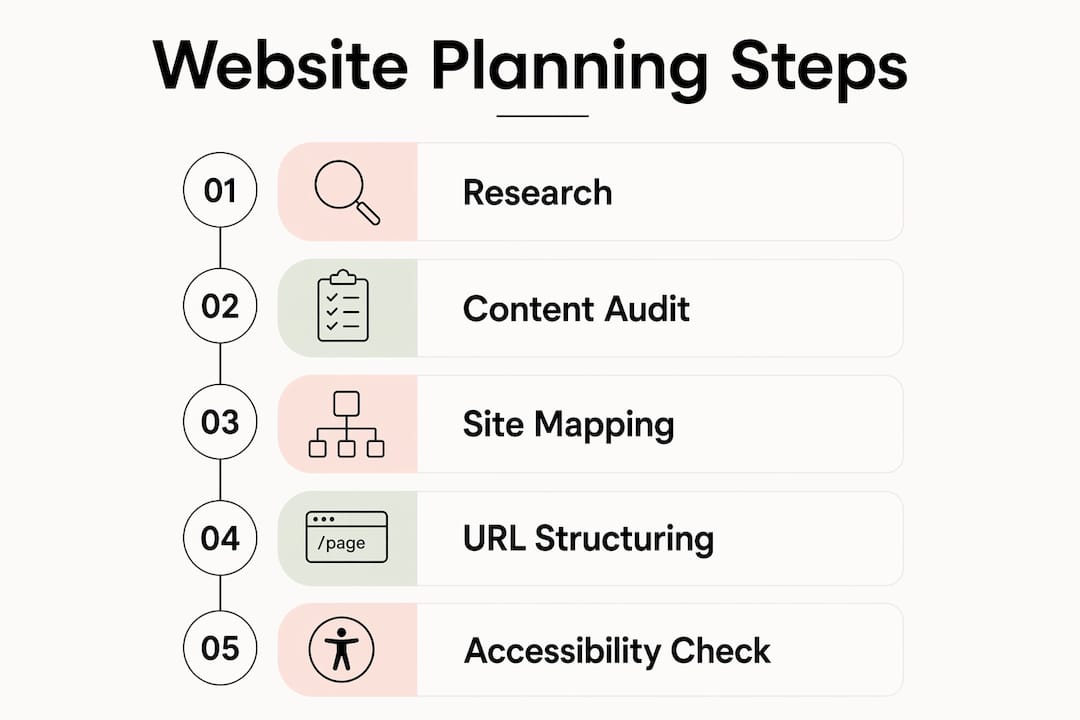
A reliable planning process follows a defined sequence before any design or development work begins. Skipping steps here is where most website projects go wrong. The following workflow applies whether you are building a five-page service site or a fifty-page authority site.
- Define your goals and audience. What actions do you want visitors to take? Who are they, and what are they searching for? This shapes every decision that follows.
- Conduct a content inventory. If you have an existing site, audit every page. Note what performs, what duplicates, and what is missing. Tools like Screaming Frog SEO Spider or Google Search Console give you the data you need.
- Build your sitemap. Use a tool like Slickplan, Octopus.do, or a simple spreadsheet to map every page, its parent category, and its URL. This is your structural blueprint.
- Create a keyword map. Assign one primary keyword and two to three supporting terms to each page. Cross-reference to check for cannibalisation.
- Wireframe key pages. Use Figma, Balsamiq, or even paper sketches to lay out page structure. Build wireframes from real content drafts, not Lorem Ipsum.
- Run an accessibility check. Before handing off to a developer, test colour contrast with tools like WebAIM Contrast Checker and review your structure against WCAG 2.2 guidelines.
- Conduct a pre-launch SEO audit. Check URL structure, internal linking, page titles, and meta descriptions using tools like Ahrefs or Semrush.
| Planning tool | Primary use |
|---|---|
| Screaming Frog SEO Spider | Content inventory and technical audit |
| Slickplan or Octopus.do | Visual sitemap building |
| Figma or Balsamiq | Page wireframing |
| Google Search Console | Keyword and performance data |
| WebAIM Contrast Checker | Accessibility compliance |
What are the common pitfalls in planning business website structure?
The most damaging mistakes in website structure planning are not technical. They are decisions made too early, without enough information, that become expensive to undo.
- Building on placeholder text. Designing pages around Lorem Ipsum means the layout has never been tested against real content. Headers that look clean with dummy text often break with actual service descriptions or location names.
- Ignoring accessibility from the start. Accessibility should be treated as a cornerstone of content design, not a box to tick at the end. Retrofitting contrast ratios, font sizes, and keyboard navigation after launch is far more costly than building them in from day one.
- Overly deep navigation. Sites with five or six levels of navigation bury content from both users and crawlers. If a page is important, it should be reachable in three to four clicks.
- Mismatched content and intent. Many SMEs write all pages in the same style regardless of whether the visitor is researching or ready to buy. This reduces engagement and conversion rates across the board.
- No internal linking plan. Without a deliberate linking strategy, pages become isolated. Search engines cannot determine topical relationships, and link equity pools in the wrong places.
- Neglecting scalability. A structure designed for ten pages will fight you when you reach thirty. Plan your category architecture to accommodate new services, locations, and content topics from the outset.
“The most costly website mistake is not a technical error. It is building a structure around assumptions about your audience rather than evidence about what they actually search for and need.”
Check the gtwelve guide on where enquiries disappear for a direct look at how structural problems translate into lost business.
How to create a scalable and accessible website structure
A scalable site structure is one you can extend without breaking what already works. The key is planning your topic clusters and URL hierarchy with growth in mind from the beginning, not as an afterthought.
A topical authority pillar typically requires between 12 and 30 cluster pages to demonstrate comprehensive coverage to search engines. Most pillar structures contain three to six sub-topics, each supported by three to six cluster pages. Planning for this scale upfront means your URL structure, navigation, and internal linking can absorb new content without restructuring.
A machine-first architecture approach defines your content data points before visual design begins. This means identifying discrete pieces of information, such as service descriptions, pricing, location, and availability, and building page templates around those content types. The result is a site that is easier for both search engines and users to parse.
SEO-friendly site architecture directly affects bounce rates, engagement, and link equity distribution, all of which influence rankings. A well-planned structure helps users find information quickly and signals topical relevance to crawlers.
| Scalability factor | Recommended approach |
|---|---|
| Topic clusters | Plan for 12 to 30 cluster pages per pillar topic |
| URL depth | Keep pages within 4 levels of the homepage |
| Navigation growth | Use mega menus or category hubs for sites over 30 pages |
| Accessibility | Apply WCAG 2.2 standards at the wireframe stage |
| Content templates | Define data fields before designing page layouts |
Key takeaways
A business website structure built on clear hierarchy, intent-mapped content, and deliberate internal linking will outperform one built on assumptions every time.
| Point | Details |
|---|---|
| Hierarchy and depth | Keep all critical pages within 3 to 4 clicks of the homepage for users and crawlers. |
| Intent mapping | Assign a distinct search intent and primary keyword to every page to prevent cannibalisation. |
| Content-first wireframing | Build wireframes from real copy to expose layout problems before development begins. |
| Accessibility compliance | Apply WCAG 2.2 standards at the planning stage, not as a post-launch fix. |
| Scalable cluster planning | Design your topic clusters to support 12 to 30 pages per pillar from the outset. |
Why I think most UK SMEs plan their websites in the wrong order
The pattern I see most often with UK service businesses is this: they choose a design template, fill it with placeholder content, and then wonder why the site does not rank or convert. The design came first. The content and structure came second. That order produces websites that look reasonable but perform poorly.
Content-led design works differently. You start with what your customers actually search for, map those queries to specific pages, and then design around the content those pages need. The result is a site where every page has a clear job, a clear audience, and a clear next step. It is not a more complicated process. It is a more disciplined one.
The other thing I would push back on is the idea that accessibility is a concern only for large organisations or public sector bodies. For a UK trades business or local service provider, a site that fails basic contrast or font-size standards is losing customers who simply cannot read it comfortably on a phone. That is a direct revenue problem, not a compliance abstraction.
If you are planning a new site or a rebuild, spend the first week on your sitemap and keyword map before you open a design tool. The gtwelve guide on must-have pages for UK trade websites is a practical starting point for getting that page list right. The planning work is where the real value is created.
— Ben
How gtwelve helps UK businesses plan and build better websites

gtwelve works with UK service businesses and SMEs to plan, build, and optimise websites that generate real enquiries. That means starting with your sitemap and keyword map, not a design template. Every site gtwelve builds is structured for SEO from day one, with content mapped to user intent, accessible page layouts, and internal linking built into the architecture rather than added as an afterthought. If you are planning a new site or need to fix a structure that is not performing, talk to gtwelve about where to start. The planning stage is the highest-value part of any website project, and it is where most businesses need the most support.
FAQ
What is website structure planning?
Website structure planning is the process of organising a site’s pages, navigation, URLs, and internal links before development begins. It covers both the technical hierarchy search engines crawl and the content flow users experience.
How many clicks should it take to reach any page?
Critical pages should be reachable within three to four clicks from the homepage. Deeper pages are harder for both users to find and search engine crawlers to index reliably.
What is a pillar and cluster content structure?
A pillar page covers a broad topic in depth, while cluster pages cover specific subtopics and link back to the pillar. Topical authority architecture typically requires 12 to 30 cluster pages per pillar to demonstrate comprehensive coverage.
Why does accessibility matter for UK business websites?
WCAG 2.2 accessibility standards improve usability for all visitors and carry legal weight under the Equality Act 2010 for UK businesses. Applying them at the planning stage is far less costly than retrofitting them after launch.
How do I avoid keyword cannibalisation when planning my site?
Assign one primary keyword to each page and map all keywords in a spreadsheet before writing any content. This prevents two pages from competing for the same query and ensures every page has a distinct purpose in your site architecture.
Recommended
If this sounds like your website, we can take a look.
Note 49 of 72