How to track phone calls from website visitors
21 May 2026 · 3 min read
How to track phone calls from website visitors

Every time a visitor calls your business directly from your website, your analytics platform almost certainly logs it as a bounce. No conversion recorded. No source attributed. Just a lost data point that quietly distorts your marketing decisions. If you rely on phone calls to generate enquiries, and most UK service businesses do, then failing to track phone calls from website visitors means you are spending money on channels you cannot properly evaluate. This guide covers Dynamic Number Insertion, Google Ads call tracking, and the compliance considerations you need to get it right.
Table of Contents
Key takeaways
| Point | Details |
|---|---|
| DNI is the foundation | Dynamic Number Insertion swaps numbers per visitor session, connecting calls to specific sources and journeys. |
| Pool size affects accuracy | Size your number pool based on traffic volume and how long visitors typically take before calling. |
| Google Ads needs exact formatting | Number format mismatches between GTM and your website will cause forwarding number replacement to fail. |
| Compliance is non-negotiable | Call recording consent rules vary by region; plan your disclosure workflow before going live. |
| Start simple, then scale | Begin with channel-level attribution and move to session-level tracking once your setup is stable. |
Tools you need to track phone calls from website visitors
Before touching a single line of code, you need to understand what call tracking actually does and what you need in place to make it work.
Without session-level DNI, you only know that a call came from your website. You do not know which page triggered it, which campaign drove the visitor, or whether it was organic search, paid ads, or a referral. That is the difference between knowing calls happened and knowing what caused them.
Here is what you need before setup:
-
A call tracking platform. Choose one that supports Dynamic Number Insertion and session-level attribution. Most platforms offer number pools, call recording, and basic analytics.
-
Website editing access. You need to be able to add a JavaScript snippet to every page, ideally via a tag manager.
-
A Google Ads account (if you run paid campaigns). You will use this for forwarding numbers and conversion tracking.
-
A number pool. This is a set of virtual phone numbers that the platform rotates between visitors. Each visitor sees a unique number tied to their session.
The table below summarises the core tools and their purpose:
| Tool | Purpose |
|---|---|
| Call tracking platform | Manages number pools, session data, and call attribution |
| JavaScript snippet | Swaps phone numbers on your site per visitor session |
| Google Tag Manager | Deploys tracking tags without editing site code directly |
| Google Ads account | Enables call conversion tracking and forwarding numbers |
| Number pool | Provides unique numbers per session for accurate attribution |
Pro Tip: Choose your attribution granularity before you set anything up. Channel-level tracking (organic vs paid) requires fewer numbers than session-level tracking, which assigns a unique number to every individual visitor.
Setting up Dynamic Number Insertion step by step
DNI is the technical backbone of any serious call tracking setup. Here is how it works in practice and how to configure it correctly.
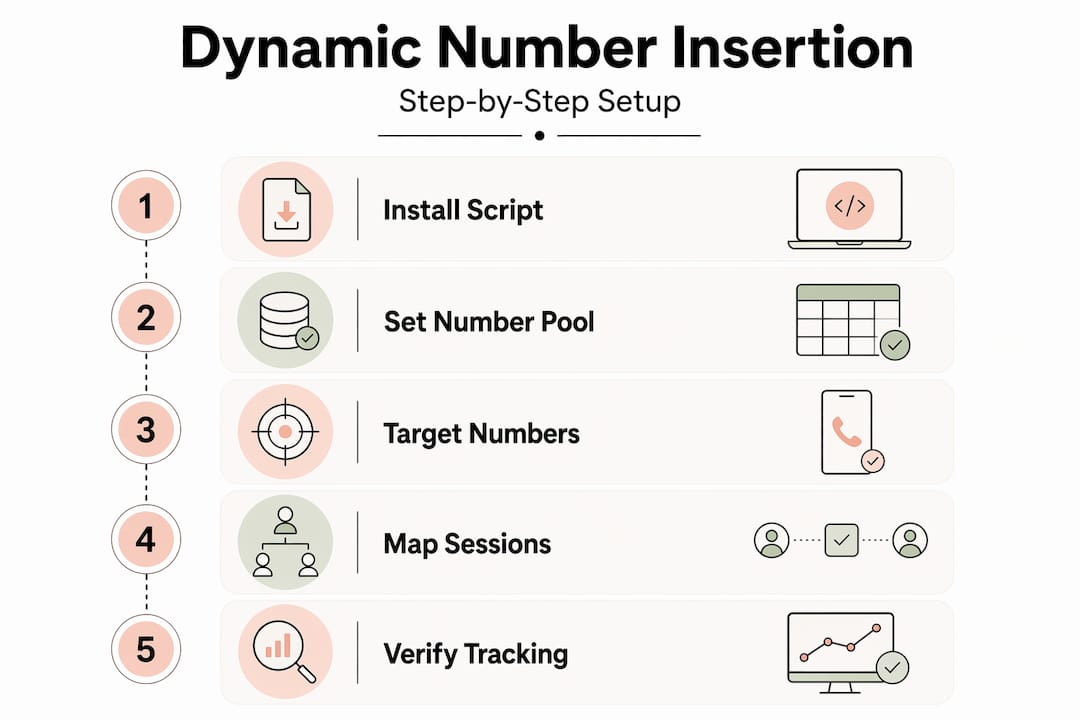
DNI uses a JavaScript script to swap the phone number displayed on your website with a tracking number from your pool. When a visitor lands on your site, the script assigns them a number. That number is tied to their session data, including traffic source, landing page, device, and location. When they call, the platform matches the inbound call to the session.
Step 1: Install the tracking script
Add your call tracking platform’s JavaScript snippet to every page of your website. The easiest way is through Google Tag Manager, using an All Pages trigger. This avoids editing individual page templates.
Step 2: Configure your number pool
Set up a pool of virtual numbers inside your platform. The size of the pool depends on your traffic. A rough rule: if 50 visitors are on your site at any given time and your average session lasts 30 minutes, you need at least 50 numbers available at once.
Step 3: Target the phone numbers on your site
Tell the platform which phone numbers to replace. Most platforms let you target by CSS class, exact number match, or both. Make sure every instance of your number on the page is covered, including header, footer, and any sticky contact bars.
Step 4: Map sessions to tracking numbers
The platform assigns a tracking number to each visitor session and holds that assignment for a defined window. Once the session expires, the number returns to the pool and becomes available for a new visitor.
Step 5: Test the swap
Open your website in a private browser window and check that the number displayed is a tracking number, not your main business number. Use your platform’s testing tools or manually call the number to confirm it routes correctly.
Step 6: Verify SEO safety
DNI does not affect your SEO because the number swap happens client-side via JavaScript after the page loads. Search engine crawlers see your original number, so your NAP consistency and local SEO signals remain intact.
Once DNI is live, your platform will start capturing detailed session data for every call: traffic source, landing page, pages viewed during the session, device type, browser, and geographic location. That data is what transforms call tracking from a simple call counter into genuine website call analytics.
Pro Tip: Set up a dedicated test campaign or UTM-tagged URL to verify that source attribution is working correctly before you rely on the data for decisions.
Integrating call tracking with Google Ads and GTM
If you run paid search campaigns, connecting call tracking to Google Ads is where you see the clearest return on your investment. You can attribute calls directly to the keywords and ads that generated them.
Step 1: Enable call reporting in Google Ads
Go to your Google Ads account settings and turn on call reporting. This allows Google to assign forwarding numbers to your ads and website, routing calls through Google’s tracking infrastructure while recording call metrics.
Step 2: Create a call conversion action
In Google Ads, navigate to Tools and Settings, then Conversions. Create a new conversion action of type “Phone calls” and set the minimum call duration that counts as a conversion. Thirty seconds is a common starting point for service businesses.
Step 3: Set up Google Tag Manager tags
You need two GTM tags:
-
Conversion Linker tag: Fires on all pages and passes Google click ID (GCLID) data to cookies. This is what links ad clicks to subsequent calls.
-
Call Conversion tag: Fires when a visitor clicks or calls the Google forwarding number. This sends the conversion signal back to Google Ads.
Step 4: Match your number format exactly
Number format mismatches are the most common reason Google forwarding number replacement fails. If your website displays “07700 900 123” but GTM is configured for “+447700900123”, the replacement will not trigger. Check spaces, country codes, and punctuation carefully.
Step 5: Test with URL parameters
Append "?gclid=test` to your landing page URL to simulate an ad click. Check whether the displayed number changes to a Google forwarding number. If it does not, revisit your GTM configuration and number formatting.
The comparison below shows what you gain by combining DNI with Google Ads tracking:
| Tracking method | What you can attribute |
|---|---|
| No tracking | You know calls happened |
| Static number tracking | You know calls came from the website |
| DNI only | You know source, landing page, and session path |
| DNI + Google Ads | You know which keyword, ad, and campaign drove each call |
Google Ads forwarding numbers route calls to your business line while capturing campaign-level data. Combined with DNI for organic and direct traffic, you get full visibility across all channels.
Pro Tip: For service businesses running both paid and organic traffic, use your call tracking platform for session-level DNI across all sources, and layer Google Ads conversion tracking on top specifically for paid attribution. The two systems complement each other rather than compete.
Common challenges and best practices
Even a well-configured call tracking setup will produce inaccurate data if you do not account for a few practical realities.
Unmatched calls are the most common issue. They happen when a visitor saves your tracking number and calls back hours or days later, after the session has expired and the number has been reassigned. Platforms typically use a one-hour matching window for session-to-number attribution. Calls outside that window may not attribute correctly.
The fix is to size your number pool based on your visitors’ decision lag. A plumber gets called within minutes. A solicitor might get called three days after a site visit. Balancing pool size with expected call delays is what separates accurate data from misleading reports.
Other practical issues to address:
-
Inconsistent number placement. If your phone number appears in different formats across your site, some instances may not be swapped. Audit every page.
-
Script loading failures. If your tracking script loads slowly or fails on certain pages, visitors on those pages will see your main number and calls will go untracked.
-
Outdated tracking scripts. Call tracking platforms update their scripts periodically. Check your implementation every few months.
On compliance, the rules are clear but often ignored. Consent requirements for call recording vary depending on where your callers are located. In the UK, one-party consent generally applies, but if you serve customers in other jurisdictions or record calls for training purposes, you may need explicit pre-call disclosure. Build your disclosure into your call greeting before you go live, not after.
Accurate call data is only useful if it is legally obtained. Plan your compliance workflow at the same time as your technical setup, not as an afterthought.
Pro Tip: Review your call recordings regularly alongside your session data. Patterns in what callers ask about often reveal gaps in your website content that, once addressed, reduce call volume and improve self-service conversion.
My honest take on call tracking for service businesses
I have worked with enough service businesses to know that most of them are making marketing decisions based on incomplete data. They see enquiry forms in their analytics, they see some organic traffic, and they assume the picture is reasonably accurate. It is not.
The calls are invisible. And in most service sectors, calls convert at a significantly higher rate than form submissions. When those calls are not attributed, the channels driving them look underperforming. Budgets shift away from what is actually working.
What changed things for the businesses I have seen get this right was not the technology. It was the decision to treat phone calls as a measurable conversion event rather than an offline activity. Once you make that decision, DNI and Google Ads call tracking are just the tools you use to act on it.
I will say this plainly: static tracking is not enough. Knowing that calls came from your website tells you almost nothing useful. Session-level tracking tells you which pages, which keywords, and which campaigns are actually generating revenue conversations. That is the data that changes how you spend your budget.
My advice is to start with DNI on your highest-traffic pages, get your Google Ads conversion tracking in place, and then expand. Do not try to build the perfect setup on day one. A working, compliant, session-level system beats a complicated one that nobody trusts.
— Ben
How Gtwelve helps you connect calls to conversions
If you want to track phone calls from website visitors without spending weeks configuring scripts and debugging GTM tags, Gtwelve builds this into the websites we create and the systems we maintain for UK service businesses. We set up DNI, connect call data to your Google Ads account, and make sure your attribution is accurate from day one.
Our approach connects call tracking to your wider enquiry workflow, so calls feed into your CRM, trigger follow-up sequences, and appear alongside your other conversion data. You get a clear picture of what is generating business, not just what is generating traffic. Visit Gtwelve to find out how we can set this up for your business.
For businesses that also want to capture visitors who are not ready to call, ChatzyBot offers AI chat engagement that works alongside call tracking to cover more of your enquiry journey.
FAQ
What is Dynamic Number Insertion?
Dynamic Number Insertion is a method that swaps the phone number displayed on your website per visitor session using a JavaScript script. It connects inbound calls to the specific source, page, and session that triggered them.
Does call tracking affect my local SEO?
No. Because the number swap happens client-side via JavaScript after the page loads, search engine crawlers see your original number. Your NAP consistency and local search signals are not affected.
How many tracking numbers do I need in my pool?
Your pool size should reflect your peak concurrent visitors and the typical time between a site visit and a call. Businesses where visitors take days to decide need larger pools to avoid unmatched calls.
Is it legal to record calls from website visitors?
In the UK, one-party consent generally applies, but you should provide a pre-call disclosure in your call greeting. If you serve customers in other regions, check local consent laws before recording.
Can I track both paid and organic calls together?
Yes. Use your call tracking platform’s DNI for all traffic sources and layer Google Ads conversion tracking on top for paid attribution. The two systems work together to give you full-channel visibility.
Recommended
If this sounds like your website, we can take a look.
Note 70 of 72