Small business website redesign steps: 2026 guide
3 June 2026 · 3 min read
Small business website redesign steps: 2026 guide

A website redesign is defined as the structured process of overhauling a site’s design, content, and technical foundation to improve performance, user experience, and search visibility. For UK small businesses, following clear small business website redesign steps is the difference between a project that drives real enquiries and one that quietly damages your search rankings. GoDaddy outlines a 12-step process covering audit, goal-setting, competitor research, and migration mapping. Get the sequence right and your redesign pays for itself. Get it wrong and you spend months recovering lost ground.
What initial prep and audit should small businesses do first?
The audit phase is where most redesigns succeed or fail before a single page is designed. You need a clear picture of what your current site is doing well, what it is failing at, and what your redesign must achieve. Skipping this step means building on guesswork.
Start with a technical and performance review using Google Analytics and Google Search Console. Pull your top-performing pages by organic traffic, identify pages with high bounce rates, and flag any crawl errors or indexing issues. These data points tell you what content to protect and what to replace.
Cover these areas in your audit:
- Traffic and conversions: Which pages generate enquiries? Where do visitors drop off?
- SEO health: Crawl errors, broken links, missing metadata, and duplicate content.
- User experience: Is the site mobile-friendly? Does it load in under three seconds?
- Content quality: Is the copy accurate, relevant, and written for your current audience?
- Competitor benchmarking: Review three to five competitor sites for structure, messaging, and features.
Discovery and strategy phases typically last two to four weeks and produce foundational documents that guide design, content, and SEO decisions. This upfront investment reduces build errors and keeps the project on scope. Treat it as non-negotiable, not optional.
Pro Tip: Run a short survey with five to ten recent customers asking what they found confusing or missing on your current site. Their answers will surface UX problems that no analytics tool can detect.
Set your redesign goals before briefing any designer or developer. Goals should be specific: increase contact form submissions by 20%, reduce page load time to under two seconds, or rank on page one for three target keywords. Vague goals produce vague results.
How to plan and design your redesigned website for best results
Planning the structure of your new site before touching any visual design is the most underrated step in the entire website redesign process. Information architecture comes first. This means mapping every page, deciding what stays, what merges, and what gets removed.

Build a sitemap that reflects how your customers think, not how your business is organised internally. A plumber’s site should lead with services and locations, not company history. Once the sitemap is agreed, create wireframes for key pages. Wireframes are simple black-and-white layouts showing content blocks and calls to action without any visual styling. They let you test structure and logic before spending money on design.
When moving into visual design, align every decision with your brand values and customer expectations:
- Colour palette and typography: Consistent with existing brand assets unless a full rebrand is part of the project.
- Mobile responsiveness: Design for mobile screens first. Google uses mobile-first indexing, so a desktop-only design approach is a technical liability.
- Accessibility: Follow WCAG 2.1 AA standards as a minimum. This covers colour contrast, font size, and keyboard navigation.
- SEO structure: Plan your URL structure, page titles, H1 headings, and internal linking before development begins. Changing these after build creates unnecessary rework.
- Stakeholder sign-off: Get approval on wireframes and design mockups from decision-makers before development starts. Late-stage changes are expensive.
Assigning a dedicated content owner at this stage prevents one of the most common project delays: content not being ready when developers need it. Decide who writes, approves, and delivers copy for every page, and set firm deadlines.
What does the development, content migration, and SEO migration process involve?
The development phase runs three parallel workstreams simultaneously. Managing them in sequence adds weeks to your timeline and risks launching without complete tracking data.
- CMS setup and build: Configure your content management system (WordPress, Webflow, or similar), build page templates, and populate content as it is approved.
- Analytics and tracking configuration: Install GA4, set up Google Tag Manager, and configure conversion events before the site goes live. Pre-launch tracking setup including GTM and GA4 must be verified after go-live to confirm accurate measurement.
- SEO migration and redirect mapping: Create a comprehensive 301 redirect map that covers every URL on your current site. Incomplete redirect maps cause 404 spikes and ranking instability by exposing old indexed URLs incorrectly.
The redirect map is the single most critical technical document in any redesign. Every old URL that changes must point to its closest equivalent on the new site. A spreadsheet with two columns, old URL and new URL, is sufficient. Test every redirect before launch.
Pro Tip: Use Screaming Frog to crawl your current site and export a full URL list. This becomes the foundation of your redirect map and takes the guesswork out of coverage.
| Development task | When to complete | Owner |
|---|---|---|
| CMS setup and templates | Weeks 1–2 of build | Developer |
| Content population | Weeks 2–4 of build | Content owner |
| GA4 and GTM configuration | Week 3 of build | Developer or analyst |
| 301 redirect map | Week 3 of build | SEO lead |
| Staging QA and testing | Final week before launch | Developer and client |
Quality assurance on a staging environment is where you catch problems before they reach real visitors. Test every form submission, check all internal links, verify mobile rendering on actual devices (not just browser emulation), and run a page speed check using Google PageSpeed Insights. User acceptance testing with actual customers catches UX issues that internal reviewers miss because familiarity blinds you to friction.
How to execute the launch and what post-launch steps secure performance
The go-live sequence matters as much as the build itself. Rushing the launch or skipping checks creates problems that are far harder to fix once real traffic is flowing.
Follow this sequence on launch day:
- Deploy your full 301 redirect map before making the new site publicly accessible.
- Complete the DNS cutover and allow up to 48 hours for full propagation.
- Verify SSL certificate is active and all pages load over HTTPS.
- Check mobile page load speed on a real device using a 4G connection.
- Submit your updated XML sitemap to Google Search Console.
- Confirm GA4 is recording sessions and conversion events correctly.
- Test every contact form and enquiry path end to end.
Orderly go-live steps combined with immediate post-launch technical checks underpin stable site launches and SEO continuity. A missed redirect or broken form on day one can cost you enquiries that you will never know you lost.
Once live, your monitoring work begins. Daily Google Search Console checks for the first 30 days are the standard recommended by SEO professionals. Review indexing status, crawl stats, and the URL Inspection tool each morning. Flag any spike in 404 errors immediately and resolve within 24 hours.
SEO rankings can fluctuate for two to three months after a redesign due to content restructuring and platform migration. This is normal, but only if your redirects are in place and your content quality has improved. A drop that persists beyond three months signals a structural problem that needs investigation. Keep your development team available for rapid fixes during this window. Understanding where enquiries disappear post-launch is as important as monitoring rankings.
Key takeaways
A successful website redesign for a small business requires a structured sequence covering audit, planning, SEO migration, staged development, and disciplined post-launch monitoring.
| Point | Details |
|---|---|
| Audit before designing | Use Google Analytics and Search Console to identify what to protect and what to fix before any design work begins. |
| Redirect map is non-negotiable | Build and test a complete 301 redirect map before launch to prevent ranking loss and 404 errors. |
| Run parallel workstreams | Develop CMS, content, and analytics simultaneously to avoid delays and launch with complete tracking in place. |
| Monitor for 30 days post-launch | Check Google Search Console daily for the first month to catch indexing and crawl issues early. |
| Expect ranking fluctuation | Rankings may shift for up to three months after launch. Sustained drops beyond that point require investigation. |
What I have learned from redesigns that nearly went wrong
The redesigns I have seen go smoothest share one characteristic: the discovery phase was treated as seriously as the design phase. Teams that rush straight to visual concepts almost always hit a wall mid-build when they realise the sitemap does not reflect the customer journey, or the content is not ready, or nobody agreed on the URL structure.
The redirect map issue is where I have seen the most damage done. Businesses spend thousands on a new site and then lose 40% of their organic traffic in the first month because old URLs were not redirected correctly. It is not a design flaw. It is a process failure that happens when SEO is treated as an afterthought rather than a parallel workstream.
Post-launch monitoring is the step most small businesses skip because the project feels finished. It is not finished. The first 30 days after launch are when the most recoverable problems surface. A daily five-minute check of Google Search Console is the cheapest insurance you can buy for a redesign investment.
One more thing: content ownership. I have watched projects stall for weeks because nobody was responsible for writing the service pages. Assign a named person with a deadline before development starts. Not a committee. One person.
The businesses that get the most from a redesign treat it as the start of an ongoing growth system, not a one-off project. The site you launch is version one. What you learn from monitoring it shapes version two.
— Ben
Ready to redesign your small business website?
If you are a UK service business planning a web update and want it done properly, gtwelve builds conversion-focused websites with SEO migration, GA4 tracking, and post-launch monitoring built into the process from day one.

We work with trades, local service providers, and SMEs across the UK to create sites that look professional, generate better enquiries, and connect directly into your business workflows. Whether you need a full overhaul or a targeted improvement, gtwelve’s website services are built around measurable outcomes, not just good-looking pages. Get in touch to discuss your project and find out what a structured redesign could do for your online presence.
FAQ
What are the key small business website redesign steps?
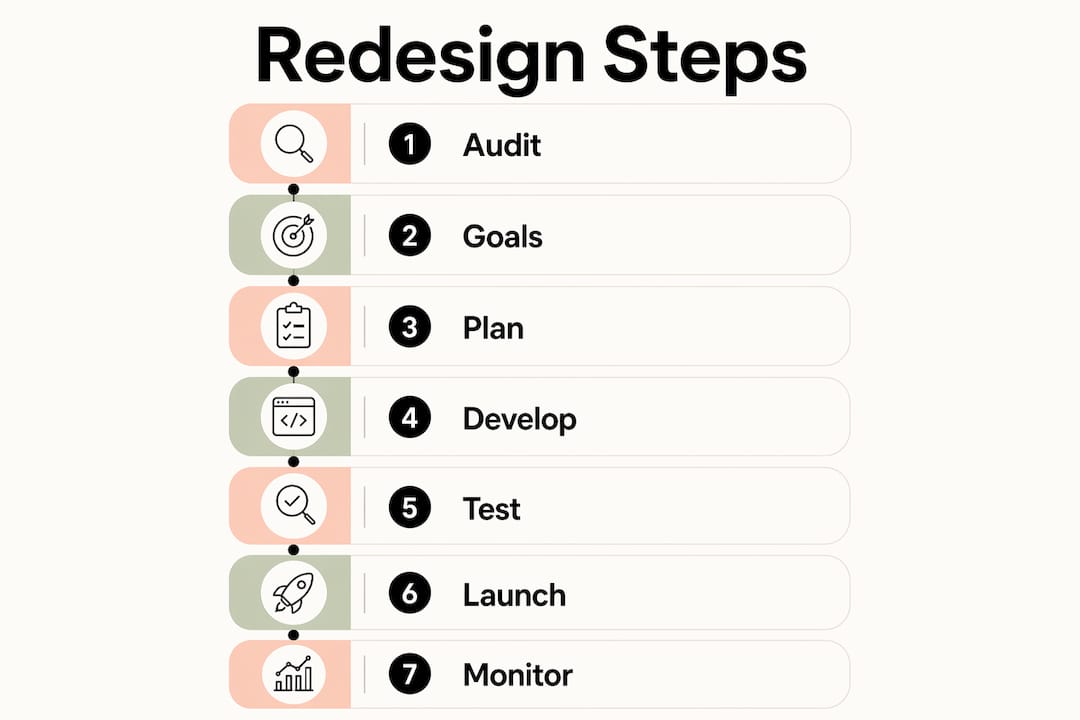
The core steps are: audit your current site, set measurable goals, plan your sitemap and SEO structure, build on a staging environment, migrate content and redirects, then launch with immediate technical checks followed by 30 days of monitoring.
How long does a small business website redesign take?
Most small business redesigns take eight to sixteen weeks from discovery to launch, depending on site size and content readiness. Discovery and strategy alone typically take two to four weeks.
Will a redesign hurt my Google rankings?
Rankings can fluctuate for two to three months after a redesign. The primary risk is poor redirect management. A complete 301 redirect map deployed before launch protects the majority of your existing SEO value.
When should I rebuild rather than redesign my site?
Rebuild decisions are driven by foundational issues such as a slow or inflexible CMS, poor mobile performance, or structural SEO problems that cannot be fixed within the existing platform. If the technical foundation limits performance, a rebuild is the correct choice.
Do I need GA4 set up before my new site launches?
Yes. GA4 and conversion tracking must be configured and tested before launch. Launching without verified tracking means losing baseline data that you cannot recover retrospectively.
Recommended
If this sounds like your website, we can take a look.
Note 51 of 72