How online enquiry forms work: a guide for UK businesses
24 June 2026 · 3 min read
How online enquiry forms work: a guide for UK businesses

Online enquiry forms are interactive website elements that capture structured visitor information, categorise submissions, and trigger automated processes to connect businesses with potential customers. Unlike a bare email link, a well-built contact form controls exactly what data you receive, routes it to the right person, and kicks off a follow-up workflow without manual effort. For UK service businesses handling multiple enquiry types, that structure is the difference between a managed pipeline and a cluttered inbox. This guide explains the mechanics, best practices, and common pitfalls of digital enquiry forms in plain terms.
How online enquiry forms work: the core mechanics
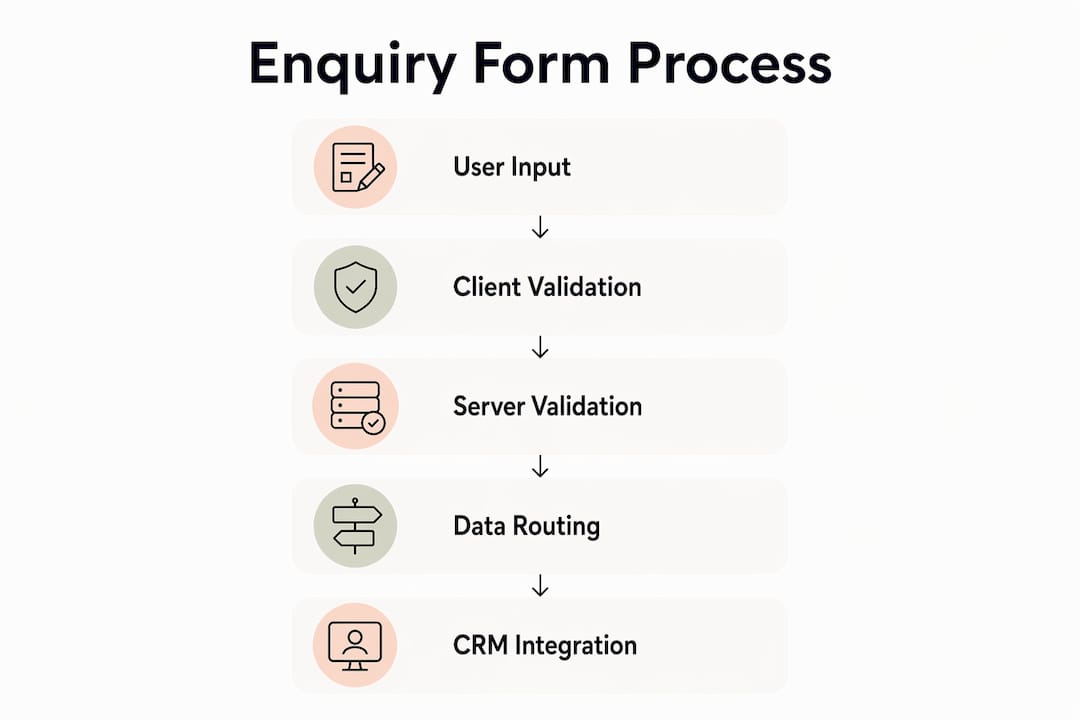
An online enquiry form is a structured HTML element embedded in a webpage. It presents visitors with labelled input fields, collects their responses, and sends the data to a server when they click submit. The industry term for this process is form submission, and it involves two distinct layers: the frontend (what the visitor sees) and the backend (what happens to the data after submission).
The frontend handles labels, placeholder text, dropdown menus, and client-side validation. Client-side validation checks basic rules in the browser, such as whether an email address contains an “@” symbol, before the form is submitted. This improves the visitor experience but offers no real security protection.

The backend is where the real work happens. Server-side validation treats every incoming field as untrusted data and checks it again on the server, blocking spam and malicious input. After validation, the data is stored, routed, and processed. This is also where CRM integration occurs: mapping form fields to specific identity records synchronously upon submission lets businesses resolve or create customer records before a confirmation message is even sent to the visitor.
What are the main components inside an enquiry form?
Every effective enquiry form shares a common set of components. Understanding each one helps you build forms that collect the right data and route it correctly.
- Input fields. These include text boxes, email fields, telephone number fields, and message areas. Mark fields as required or optional based on what your team genuinely needs to respond.
- Enquiry type dropdown. Adding a query-type field is the single biggest upgrade to any contact form. It routes submissions automatically to the correct team or CRM stage without manual sorting.
- Labels and placeholders. Labels tell visitors what to enter. Placeholders show an example inside the field. Both reduce errors and abandoned forms.
- Client-side validation. Instant feedback in the browser catches obvious mistakes before submission. It improves completion rates but must never replace server-side checks.
- CAPTCHA or honeypot fields. These are spam prevention tools. A honeypot field is invisible to real visitors but filled in by bots, flagging the submission as spam automatically.
- Confirmation message. After submission, a clear on-screen message tells the visitor what happens next and when to expect a response.
Pro Tip: Name your form fields with consistent, descriptive attributes (for example, “enquiry_type” rather than “field_3”). This makes CRM mapping far cleaner and reduces errors when you update the form later.
The routing logic tied to the enquiry type dropdown is particularly powerful. A visitor selecting “new project quote” can be sent directly to your sales pipeline, while “existing customer support” routes to a service ticket. This happens automatically, without anyone reading and forwarding emails.
How does the form submission process support lead qualification?
The moment a visitor submits an enquiry form is a moment of declared intent. They have chosen to engage, provided their contact details, and described their need. That data is far more useful than a generic email if you capture and use it correctly.
- Categorise on arrival. The enquiry type field sorts submissions before anyone reads them. Sales enquiries, support requests, and partnership proposals each follow a different workflow from the point of submission.
- Map to your CRM immediately. Synchronous field mapping creates or updates a customer record the instant the form is submitted. Your team sees the full context before they pick up the phone or write a reply.
- Send a personalised acknowledgement. Personalised follow-up emails that reference the specific enquiry type perform significantly better than generic “thank you” messages. Reference what the visitor asked about, not just their name.
- Layer data over time. Progressive profiling lets you collect more detailed information across multiple interactions rather than demanding everything upfront. A first form captures name, email, and enquiry type. A follow-up form or survey adds budget, timeline, and project detail.
- Trigger task creation. A well-integrated form can automatically create a task in your project management tool, add a calendar reminder, or generate a draft quote, depending on the enquiry type selected.
“Treating enquiry forms as live operational documents rather than static design elements ensures continuous process improvement and a better customer experience.” — Enquiry form best practices checklist
For UK service businesses, this process turns a passive website page into an active part of the sales and service operation. gtwelve connects enquiry forms directly into workflows covering calendars, quote generation, and follow-up sequences, so no submission sits unactioned. You can read more about tracking enquiries and conversions to see how this fits into a broader measurement approach.
What are best practices for designing effective enquiry forms?
Form design directly affects how many visitors complete a submission and how useful that data is once received. Most contact forms convert between 1% and 5%, depending on industry, design, and page context. That range is wide, and design choices explain most of the gap.
| Design element | Recommended practice |
|---|---|
| Number of enquiry categories | Keep to 5–7 options to route effectively without slowing the visitor |
| Form purpose statement | State clearly what the form is for and what happens after submission |
| Number of fields | Ask only what your team needs to respond; remove every optional field that rarely gets used |
| Confirmation message | Confirm receipt on-screen and state a realistic response timeframe |
| GDPR notice | Include a brief data use statement and link to your privacy policy before the submit button |
Pro Tip: Test your form as a visitor before publishing. Submit a real enquiry and follow the entire process: confirmation message, email receipt, CRM entry, and any automated reply. Most routing errors are caught this way.
GDPR compliance is non-negotiable for UK businesses. Your form must explain what data you collect, why you collect it, and how it is stored. A single line above the submit button, linked to your privacy policy, satisfies this requirement in most cases. Do not bury it in small print.
Regular review matters as much as initial design. Enquiry categories that made sense when you launched may no longer reflect your service mix. Reviewing form fields and routing rules every six months keeps the form aligned with how your business actually operates.
What common challenges occur with enquiry forms, and how do you fix them?
Even well-designed forms encounter problems. Knowing the most common issues lets you address them before they cost you leads.
- Spam and bot submissions. Client-side checks alone do not stop automated bots. Server-side validation on every field is the only reliable defence. Combine it with a honeypot field or a service like Google reCAPTCHA for stronger protection.
- Misrouted enquiries. Poor field naming or missing dropdown options cause submissions to land in the wrong inbox or CRM stage. Audit your routing rules whenever you add a new service or team member.
- Lost leads from generic replies. A generic “we’ll be in touch” acknowledgement does not reassure a visitor who has just shared their contact details. Reference the enquiry type in the automated reply and give a specific response window. Read more about what happens when enquiries disappear and how to prevent it.
- Poor mobile usability. Fields that are too small to tap, labels that overlap on small screens, and submit buttons hidden below the fold all reduce completion rates on mobile devices. Test every form on a phone before publishing.
- Multiple enquiry types with no distinct workflows. A single generic form trying to handle sales, support, and partnership enquiries creates confusion. Build separate routing rules, or use conditional logic to show different fields based on the enquiry type selected.
Displaying your email address publicly without a form also increases spam exposure. A form filters out low-quality contact attempts and keeps your inbox focused on genuine enquiries.
How can UK businesses create and implement their own enquiry forms?
Building an effective enquiry form is a structured process. Rushing the setup creates routing errors and data gaps that are harder to fix later.
- Choose a form tool with CRM integration. Tools such as Gravity Forms, Typeform, and Microsoft Forms each offer varying levels of CRM connectivity. Select one that maps directly to your existing customer management system.
- Define required fields based on business goals. List the minimum information your team needs to respond meaningfully. Start there. Add fields only when there is a clear operational reason.
- Build and test routing rules. Map each enquiry type to the correct team, email address, or CRM pipeline stage. Submit test entries for every category and confirm they arrive correctly.
- Write confirmation messages and automated replies. Draft an on-screen confirmation and an automated email for each enquiry type. Both should reference what the visitor submitted and state when they will hear back.
- Measure drop-off and completion rates. Use Google Analytics 4 or your form tool’s built-in reporting to identify where visitors abandon the form. A high drop-off on a specific field usually means it is unclear or feels intrusive.
- Iterate with stakeholder input. Ask the team members who receive form submissions what information is missing or redundant. Their feedback is the most direct signal for improvement.
For businesses building or rebuilding their website, gtwelve covers conversion-focused web design principles that apply directly to enquiry form placement and structure.
Key takeaways
Online enquiry forms work by combining structured data capture, server-side validation, and CRM integration to convert visitor intent into qualified, routable leads.
| Point | Details |
|---|---|
| Two-layer processing | Every form has a frontend for user input and a backend for validation, routing, and CRM integration. |
| Enquiry type field | Adding a dropdown for enquiry type is the single most effective routing upgrade for any contact form. |
| Personalised follow-up | Automated replies that reference the specific enquiry type convert better than generic acknowledgements. |
| Design discipline | Limit categories to 5–7 options, state the form’s purpose upfront, and ask only for essential information. |
| Continuous review | Treat forms as live operational tools and audit fields, routing, and performance every six months. |
The part most businesses get wrong
Most businesses set up an enquiry form once and never touch it again. I have reviewed hundreds of service business websites, and the pattern is consistent: the form was built when the business launched, it asks for the same five fields it always did, and it sends every submission to a single email address with no routing, no personalised reply, and no CRM entry.
The form is technically working. But it is doing the minimum possible. The visitor gets a generic “thank you” message. The business owner gets an email with no context about what the person actually needs. Someone has to read it, decide who should handle it, and manually follow up. That is not a system. That is a digital version of a paper enquiry slip.
What I have found genuinely moves the needle is treating the form as the first step in a workflow, not the end of one. When the enquiry type field drives automatic routing, when the CRM record is created before the confirmation email is sent, and when the automated reply references what the visitor actually asked about, the conversion rate from enquiry to booked job improves noticeably. The visitor feels heard before anyone has spoken to them.
The other thing worth saying plainly: GDPR compliance on forms is not optional, and it is not complicated. One clear sentence above the submit button, linked to your privacy policy, covers the requirement in most cases. Businesses that treat it as a burden are usually overthinking it.
If you want to go further, a follow-up system for missed contacts is the natural next step after getting your form right.
— Ben
How gtwelve can improve your enquiry process
gtwelve builds enquiry form setups that go beyond a basic contact page.

For UK service businesses, gtwelve connects forms directly into calendars, quote workflows, CRM records, and automated follow-up sequences. Every submission is routed, acknowledged, and tracked from the moment it arrives. If your current form sends everything to one inbox with no routing or automated reply, there is a straightforward fix. Visit gtwelve.co.uk to see how a properly integrated enquiry setup fits into a broader website and workflow system built for service businesses.
FAQ
What is an online enquiry form?
An online enquiry form is a structured webpage element that collects visitor information through labelled input fields and sends the data to a business via a server-side submission process. It replaces unstructured email contact with categorised, routable data.
How does an enquiry form capture data securely?
The form sends submitted data to a server, where server-side validation checks every field for malicious input or spam before storing or routing it. Client-side checks in the browser improve usability but do not provide security on their own.
How many fields should an enquiry form have?
Ask only for the information your team needs to respond. Industry guidance recommends keeping enquiry category dropdowns to between 5 and 7 options to avoid slowing the visitor or creating routing complexity.
How do enquiry forms connect to CRM systems?
Form fields are mapped to CRM record attributes so that when a visitor submits, the system creates or updates a customer record automatically. Synchronous field mapping means the CRM entry exists before the confirmation email is sent.
Do enquiry forms need to comply with GDPR?
Yes. UK businesses must inform visitors what data is collected, why it is collected, and how it is stored. A brief statement above the submit button, linked to your privacy policy, satisfies this requirement in most standard enquiry form setups.
Recommended
If this sounds like your website, we can take a look.
Note 30 of 72