How to audit and fix broken website links
9 June 2026 · 3 min read
How to audit and fix broken website links

Broken links are defined as URLs on your website that return a 4xx or 5xx error, preventing users and search engine crawlers from reaching the intended page. Every broken link you leave unfixed costs you crawl budget, link equity, and visitor trust. Tools like Screaming Frog, Ahrefs, and Google Search Console make it possible to audit and fix broken website links systematically, without guessing where the damage is. This guide walks you through every stage: identifying link types, running a thorough link integrity audit, applying the right fix for each scenario, and building a maintenance routine that stops problems from returning.
How to audit and fix broken website links: the full process
Before you open any tool, you need to understand what you are looking for. Broken links fall into three distinct categories, and each one carries different consequences for your site.
Internal broken links connect pages within your own domain. When these break, search engine crawlers hit dead ends, which directly reduces how much of your site gets indexed. A crawler that encounters repeated 404 errors on internal paths will deprioritise deeper pages, meaning content you have invested time in may never rank.

Outbound broken links point from your pages to external sites that have moved or been removed. These do not affect your crawlability directly, but they damage your credibility. A service page that links to a defunct supplier or an outdated resource signals to visitors that your site is not being maintained.
Inbound broken backlinks are external sites linking to pages on your domain that no longer exist. These are the highest SEO priority of the three. Broken backlinks from high-quality sites pointing to 404 pages represent lost referral traffic and lost ranking authority that you have already earned. Recovering them is one of the highest-return activities in technical SEO.
Prioritising which broken links to fix first
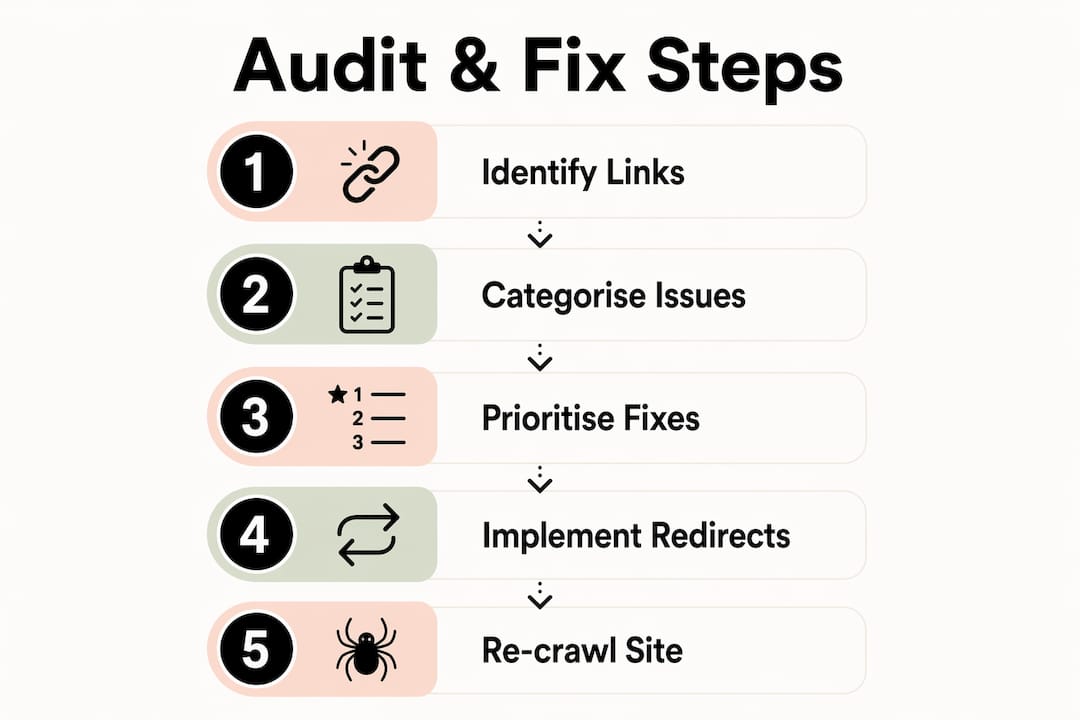
Not all broken links bear equal priority; the ones affecting traffic or link equity the most deserve your attention first. Use this order when triaging your audit results:
- Inbound broken backlinks from high-authority domains. These carry the most SEO weight. Fix or redirect these before anything else.
- Internal broken links on high-traffic pages. A 404 on a page that receives 500 visits per month is far more damaging than one on a page with five.
- Internal broken links in your main navigation or footer. These appear on every page and multiply the crawl damage.
- Outbound broken links on cornerstone content. Blog posts and service pages that cite external sources lose authority when those citations go dead.
- Outbound broken links on low-traffic pages. Address these last. They matter, but the business impact is minimal compared to the categories above.
Sorting by impact rather than volume is the approach that reduces effort and improves ROI when automated tools surface hundreds of issues at once.
What tools should you use to check broken links?
The right tool depends on your site size, technical comfort, and whether you need ongoing monitoring or a one-off audit. Here is a direct comparison of the four most widely used options.
| Tool | Best for | Scan depth | Key advantage |
|---|---|---|---|
| Screaming Frog | Technical SEO audits | Up to 500 URLs free; unlimited paid | Exports full crawl data with status codes |
| Ahrefs Site Audit | Backlink and internal link analysis | Depends on plan | Identifies broken backlinks from external sites |
| Google Search Console | Real user crawl error data | Full site, Google’s index | Shows 404s Google has actually encountered |
| Free online checkers | Quick single-page or small site checks | Single page to 10,000 pages | No installation required |
Google Search Console is the correct starting point for most site owners. The “Pages” report under “Indexing” surfaces every URL Google has flagged as not found, and you can sort by impressions to identify which 404 pages were receiving organic traffic before they broke. That data tells you exactly where link equity is being lost right now.
Screaming Frog complements Search Console by crawling your entire site and flagging every internal and outbound link returning an error, including those Google has not yet discovered. For sites with more than a few hundred pages, the paid version is worth the cost. Ahrefs Site Audit adds the dimension of broken backlinks, showing you which external domains are pointing to dead pages on your site.
Pro Tip: Export your Screaming Frog crawl as a CSV and filter by status code 404. Then cross-reference that list against your Ahrefs broken backlinks report. Any URL appearing in both lists is your highest-priority fix.
Redirect chains of three or more hops slow page speed and dilute link equity. Screaming Frog’s “Redirect Chains” report identifies these during the same crawl, so you can resolve them alongside your 404 fixes rather than in a separate pass.
How do you fix broken links effectively?
The correct fix depends entirely on the type of broken link you are dealing with. Applying the wrong method wastes time and can create new problems.
-
Fix internal broken links at source. Editing internal links directly is preferred over adding a 301 redirect. Redirects for internal links add server latency and risk creating redirect chains over time. Open the page containing the broken link, update the href to the correct URL, and save. This is the cleanest and fastest resolution.
-
Set up 301 redirects for inbound broken backlinks. When an external site links to a page you have deleted or moved, you cannot edit their link. A 301 redirect passes ranking signals reliably and tells search engines the move is permanent. Map the old URL to the most contextually relevant live page on your site.
-
Choose redirect targets carefully. Redirects to contextually relevant pages transfer equity effectively. Sending every broken URL to your homepage is a common mistake. Google may treat these as soft 404s, which means the equity is not passed at all. If a deleted blog post about boiler servicing has backlinks, redirect it to your current boiler servicing page, not your homepage.
-
Replace or archive outbound broken links. When an external page you link to has disappeared, find a current authoritative replacement. If no equivalent exists, use a Wayback Machine archive URL to preserve the citation context. Deleting the link entirely removes the reference value from your content.
-
Avoid 302 redirects for permanent fixes. A 302 tells search engines the move is temporary. 302 redirects may not pass ranking signals in the same way a 301 does. Use 302 only when a page is genuinely offline for a short period.
-
Implement redirects in your CMS correctly. WordPress users can manage 301 redirects through the Redirection plugin or Yoast SEO Premium. Webflow and Squarespace both include built-in redirect managers under site settings. If your site runs on a custom stack, redirects belong in your server configuration or .htaccess file, not in JavaScript.
Pro Tip: After implementing redirects, re-crawl the affected URLs in Screaming Frog within 48 hours. Confirm each returns a 200 status and that no new redirect chains have been created.
A good URL structure reduces how often links break in the first place. Stable, descriptive URLs that do not include dates or session parameters are far less likely to need redirecting after a site update.
How do you maintain link health over time?
A single audit fixes today’s problems. A maintenance routine prevents tomorrow’s. The frequency of your audits should match the pace at which your site changes.
- Large sites or frequently updated sites (e-commerce, news, service directories) need weekly or continuous monitoring. Tools like Ahrefs Site Audit and Screaming Frog Cloud support scheduled crawls that alert you when new 404s appear.
- Small business sites with occasional updates benefit from a monthly audit. Running Screaming Frog once a month takes under an hour and catches issues before they compound.
- Sites undergoing a redesign need a full link integrity audit both before and after the migration. A website redesign that changes URL structures without a redirect plan is one of the most common causes of mass link breakage.
Beyond scheduling, build habits that prevent breakage in the first place:
- Set a redirect before deleting or moving any page, not after.
- Use relative internal links where your CMS supports them, so domain changes do not break internal navigation.
- Check outbound links in cornerstone content every quarter. External sites change without warning.
- Build a custom 404 page that guides visitors to relevant content. A well-designed 404 page recovers a proportion of lost visits and reduces the frustration of hitting a dead end.
Outreach to webmasters of high-quality sites linking to your broken pages can recover valuable link equity. The success rate for these requests sits at 10 to 30 per cent, which is a meaningful return for a short outreach effort. Ahrefs makes it straightforward to export the referring domains for any broken URL, giving you a ready-made outreach list.
Combining automated tools with manual review is the most reliable approach. Automated tools find the volume; manual review tells you whether a flagged link is genuinely broken or a false positive caused by a login wall or geo-restriction.
Key takeaways
A systematic link integrity audit, combined with targeted fixes and a scheduled maintenance routine, is the most direct way to protect SEO equity and visitor experience on any website.
| Point | Details |
|---|---|
| Prioritise by impact | Fix broken backlinks from high-authority domains before addressing low-traffic internal links. |
| Use the right tool for each task | Google Search Console surfaces real crawl errors; Screaming Frog maps every internal and outbound link. |
| Match the fix to the link type | Edit internal links at source; use 301 redirects only for inbound backlinks you cannot edit directly. |
| Choose redirect targets carefully | Map broken URLs to contextually relevant pages, not the homepage, to preserve link equity. |
| Schedule audits to match site activity | Frequently updated sites need weekly monitoring; smaller sites benefit from monthly crawls. |
Why most broken link audits fail before they start
Most site owners run one audit, fix the obvious 404s, and consider the job done. That approach misses the point entirely. The real damage from broken links is cumulative. A single broken backlink from a high-authority domain sitting unfixed for six months represents a sustained drain on your ranking potential, not a one-time event.
What I see most often when reviewing sites for clients is a mismatch between effort and impact. Hours get spent fixing outbound links on low-traffic blog posts while broken backlinks from referring domains with genuine authority are ignored. The reason is usually visibility: outbound broken links show up immediately in free tools, while broken backlinks require a paid Ahrefs or Semrush subscription to surface properly. The investment in that data pays for itself quickly.
The other consistent mistake is redirect target selection. Sending a broken product page to the homepage feels like a reasonable fix. Google disagrees. Topically irrelevant redirects are treated as soft 404s, which means the equity you are trying to recover is discarded anyway. Taking ten minutes to identify the most relevant live page for each redirect is the difference between a fix that works and one that looks correct in your crawl report but does nothing for rankings.
My practical advice: start every audit in Google Search Console, sort the 404 report by impressions, and fix the top ten before you do anything else. Those ten fixes will deliver more SEO value than clearing a hundred low-traffic errors. Then use Ahrefs to find broken backlinks and run outreach. After that, schedule monthly Screaming Frog crawls and treat them as routine maintenance, not emergency responses.
— Ben
How gtwelve can help with your website’s link health
gtwelve works with UK service businesses and SMEs to audit, fix, and maintain website health as part of an ongoing growth system. That includes full technical SEO audits covering broken links, redirect chains, and crawlability, alongside content strategy and website structure planning that reduces the risk of link breakage during updates. If your site has grown organically over several years, the chances are there are broken links quietly costing you enquiries right now. Visit gtwelve.co.uk to find out how we can review your site and put a fix plan in place.
FAQ
What is a broken link audit?
A broken link audit is a systematic crawl of your website to identify all URLs returning error responses, including internal links, outbound links, and inbound backlinks pointing to dead pages. Tools like Screaming Frog and Google Search Console are the standard instruments for this process.
How often should I check broken links on my website?
Audit frequency depends on site size and how often content changes. Large or frequently updated sites need weekly monitoring; smaller sites with stable content benefit from a monthly crawl.
Should I use a 301 or 302 redirect to fix dead links?
Use a 301 redirect for any permanent URL change or deleted page. A 302 redirect signals a temporary move and may not pass ranking signals reliably, making it the wrong choice for fixing broken links.
Can broken links hurt my SEO?
Broken internal links reduce crawl efficiency and prevent pages from being indexed. Broken inbound backlinks waste link equity from external sites that have already chosen to reference your content, which directly affects your ability to rank.
What is the fastest way to find broken links on my site?
Open Google Search Console, navigate to the “Pages” report under “Indexing,” and filter for “Not found (404).” Sort by impressions to identify the highest-impact broken URLs first, then use Screaming Frog to map every internal and outbound broken link across the full site.
Recommended
If this sounds like your website, we can take a look.
Note 45 of 72