Website hosting explained for small business owners
28 June 2026 · 3 min read
Website hosting explained for small business owners

Website hosting is the service that stores your website’s files on a specialised server and delivers them to anyone who visits your site. Without hosting, your website simply does not exist online. The industry term is “web hosting,” and understanding website hosting basics is the first step every small business owner must take before building an online presence. Your domain and hosting are two separate purchases that work together. The domain is your address; the hosting is the property where your website actually lives.
What is website hosting explained in plain terms?
Web hosting means renting space on a server that stays online 24 hours a day, 7 days a week. When someone types your web address into a browser, that server receives the request and sends your website files back to their screen in milliseconds. You do not need to own or manage the physical machine. You pay a hosting provider to do that for you.
A good hosting provider does far more than store files. Providers manage critical services such as IP assignment, DNS configuration, automated backups, and security monitoring. That means your site stays online, stays protected, and stays findable. For a small business owner with no dedicated IT staff, that operational support is the real value of a hosting plan.

The domain name and hosting are always purchased separately. A domain without hosting is just an address with no building behind it. You need both before your website becomes publicly accessible.
How does website hosting work technically?
The process from browser request to visible webpage follows five distinct steps. Understanding them helps you make better decisions about performance and reliability.
- Browser request. You type a URL into your browser. The browser needs to find the server that holds that website’s files.
- DNS lookup. The Domain Name System (DNS) translates your human-readable domain name into a numerical IP address. Every server on the internet has a unique IP address. DNS maps domain to server IP, triggering file delivery in milliseconds.
- Connection established. Your browser connects to the server at that IP address using a communication protocol. Most websites now use HTTPS, which encrypts the data travelling between the server and your browser.
- File transfer. The server sends the HTML, CSS, images, and other files that make up your webpage back to your browser.
- Rendering. Your browser reads those files and displays the finished page on your screen.
The entire sequence typically completes in under two seconds on a well-configured server. Slow hosting breaks this chain at step four, which is why server quality directly affects how fast your site loads.
Pro Tip: Check whether a hosting plan specifies server location. A server based in the UK will deliver pages faster to UK visitors than one based in the United States, because the data travels a shorter distance.
HTTPS is not optional for business websites. It encrypts communication between your server and your visitors, protects customer data, and signals trustworthiness to both users and search engines. Any reputable hosting plan includes an SSL certificate to enable HTTPS at no extra cost.
What types of website hosting are available?
Shared hosting is the most common entry-level service for small businesses as of 2026. It places your website on a server alongside many other websites, all sharing the same physical resources. That keeps costs low but introduces a risk: traffic spikes on shared hosting can slow your site down because another site on the same server is consuming resources. For a new website with modest traffic, shared hosting is a practical starting point.
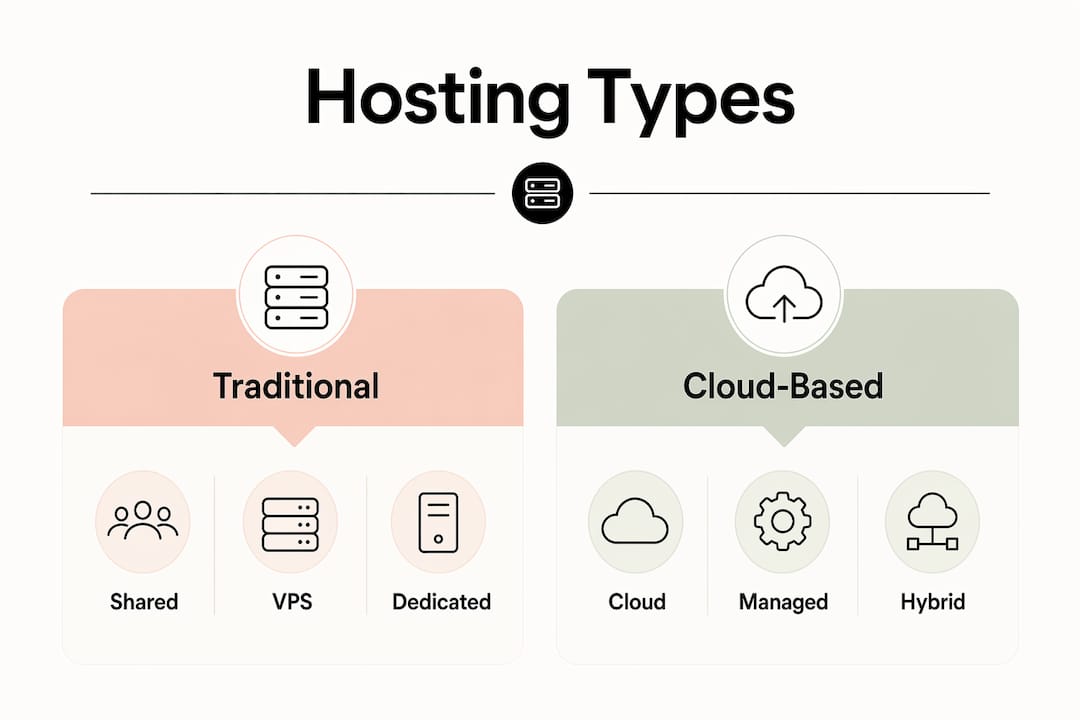
VPS (Virtual Private Server) hosting gives your website a dedicated portion of a server’s resources. You share the physical machine with fewer neighbours, and your allocation is protected. This suits businesses that have outgrown shared hosting or need more consistent performance.
Dedicated hosting means you rent an entire physical server for your website alone. No resource sharing at all. This delivers the highest performance and control, but it also carries the highest cost and requires technical knowledge to manage unless you choose a managed plan.
Cloud hosting distributes your website across a network of servers rather than a single machine. If one server has a problem, another takes over automatically. This makes cloud hosting particularly reliable for businesses where downtime would directly cost money.
| Hosting type | Typical cost | Performance | Management level | Best for |
|---|---|---|---|---|
| Shared | Low | Variable | Minimal | New sites, low traffic |
| VPS | Mid-range | Consistent | Moderate | Growing businesses |
| Dedicated | High | High | Technical | High-traffic sites |
| Cloud | Variable | Very reliable | Low to moderate | Businesses needing uptime |
Pro Tip: Start on shared hosting if your site is new and traffic is low. Plan to move to VPS or cloud hosting once you receive consistent monthly visitors. Most providers let you upgrade without rebuilding your site.
Most small businesses and sole traders do well on managed shared or managed cloud hosting. The “managed” element means the provider handles updates, security patches, and backups on your behalf.
What features should a hosting plan include?
A hosting plan is not just storage space. The features bundled with a plan determine how reliable, secure, and easy to manage your website will be.
- Storage and bandwidth. Storage is how much data your website files occupy on the server. Bandwidth is how much data can transfer between the server and your visitors each month. A standard business website with text, images, and a contact form uses very little of either. Video-heavy sites need more.
- Uptime guarantee. Reliable hosting providers offer SLAs with 99.9% uptime or better. Even small downtime periods can lead to lost revenue and poor search visibility. Always check the uptime guarantee before committing to a plan.
- Managed vs unmanaged hosting. Managed hosting shifts server maintenance tasks like security patching and backups from you to the provider. For small businesses without dedicated tech staff, managed hosting removes a significant burden. Unmanaged hosting is cheaper but requires you to handle updates and security yourself.
- Email hosting. Many plans include business email addresses on your domain, such as hello@yourbusiness.co.uk. This looks far more professional than a free Gmail or Outlook address.
- Security features. Look for SSL certificates, firewalls, malware scanning, and DDoS protection. These are not optional extras for a business website.
- Automated backups. Daily backups mean you can restore your site quickly if something goes wrong. Check how many days of backup history the provider retains.
- Control panel. Control panels like cPanel provide a user-friendly interface to manage hosting features without command-line knowledge. They let you handle files, email accounts, and databases through a graphical interface, which saves time for non-technical owners.
Website performance tracking is closely tied to hosting quality. Uptime monitoring tools let you see exactly when your site goes offline and for how long, giving you evidence to hold your provider accountable.
How much does website hosting cost, and how do you choose?
Shared web hosting typically costs between $2 and $10 per month, while dedicated hosting ranges from $80 to $300 or more per month depending on resources. VPS hosting sits between those two ranges. Cloud hosting is often priced by usage, which can be cost-effective for sites with variable traffic.
| Hosting type | Typical monthly cost | Who pays this |
|---|---|---|
| Shared | $2–$10 | Startups, sole traders, new sites |
| VPS | $20–$80 | Growing SMEs, e-commerce |
| Dedicated | $80–$300+ | High-traffic or data-intensive sites |
| Cloud | Usage-based | Businesses prioritising uptime |
Price alone is a poor guide. A $2 per month plan with no managed security, no backups, and poor uptime will cost you far more in lost business than a $15 plan that handles everything reliably. The right question is not “what is the cheapest option?” but “what does my business actually need?”
Three factors should drive your decision. First, consider your technical ability. If you cannot manage server updates yourself, choose managed hosting. Second, consider your expected traffic. A new local trades website gets very different traffic from an e-commerce store. Third, consider growth. Choosing a provider that lets you upgrade plans without migrating your entire site saves significant hassle later.
Pro Tip: Many hosting providers advertise very low introductory prices that increase sharply on renewal. Always check the renewal price, not just the sign-up offer, before committing to a plan.
Hosting your website on a home computer is strongly discouraged for businesses due to high costs, the need for continuous connectivity, and the technical expertise required to maintain security and uptime. Renting server space from a professional provider is the only practical choice for a business that needs reliability.
Key takeaways
Web hosting is the foundation of every online business presence, and choosing the right plan requires matching hosting type, features, and price to your actual technical needs and growth plans.
| Point | Details |
|---|---|
| Hosting stores your site | A server holds your website files and delivers them to visitors 24/7. |
| Domain and hosting are separate | You must purchase both before your website becomes publicly accessible. |
| Managed hosting reduces burden | Providers handle security, backups, and updates, which suits non-technical owners. |
| Uptime matters for revenue | Look for a 99.9% uptime SLA to protect search visibility and customer access. |
| Price is not the only factor | Match hosting type to your traffic, technical ability, and growth plans. |
What I have learned from watching businesses get hosting wrong
Most first-time buyers treat hosting as a commodity. They pick the cheapest plan, ignore the renewal price, and discover six months later that their site goes down regularly or loads slowly on mobile. By that point, they have already lost enquiries they will never know about.
The single biggest mistake I see is choosing unmanaged hosting without realising what that means. You are responsible for security patches, software updates, and backups. If you do not do those things, your site becomes vulnerable. For a trades business or local service provider, that is not an acceptable risk.
My honest advice is to pay a little more for managed hosting from a provider with a genuine uptime guarantee. The difference in monthly cost is trivial compared to the cost of a site that is offline when a potential customer searches for you. Professional websites for SMEs need reliable hosting as their foundation. A well-designed site on poor hosting will still underperform.
One thing that surprises many business owners: hosting quality affects your SEO. Search engines factor page speed and uptime into rankings. A slow or unreliable server directly reduces your visibility in search results, which means fewer enquiries reaching you.
Buy your domain separately from your hosting if you can. It gives you more control. If you ever need to move providers, you own the domain outright and can point it wherever you choose.
— Ben
How gtwelve supports your website and hosting decisions
Getting hosting right from the start saves time, money, and frustration. gtwelve works with UK service businesses and SMEs to build professional, conversion-focused websites that are set up on reliable hosting from day one.

If you are unsure which hosting plan suits your business, or if you want a website that is built to perform rather than just exist online, gtwelve can help. From technical setup and domain configuration to ongoing SEO and enquiry systems, gtwelve handles the details so you can focus on running your business. Speak to the team to find out what a properly built online presence looks like for your sector.
FAQ
What is the difference between a domain and hosting?
A domain is your website’s address (for example, yourbusiness.co.uk). Hosting is the server space that stores your website files. You need both for a website to be publicly accessible.
What type of hosting is best for a small business?
Managed shared hosting or managed cloud hosting suits most small businesses. Both handle security and backups on your behalf, and costs are low enough for early-stage budgets.
How does website hosting affect SEO?
Server speed and uptime directly influence search rankings. A slow or frequently offline server reduces your visibility in search results, which means fewer potential customers find you.
Can I host a website on my own computer?
Hosting a business website on a home computer is not practical. It requires continuous connectivity, technical security management, and carries high risk of downtime. Professional server rental is the standard approach.
Do I need technical knowledge to manage hosting?
Not if you choose managed hosting. Managed plans handle server maintenance, updates, and backups for you. Control panels like cPanel also let you manage files and email through a simple graphical interface.
Recommended
If this sounds like your website, we can take a look.
Note 26 of 72